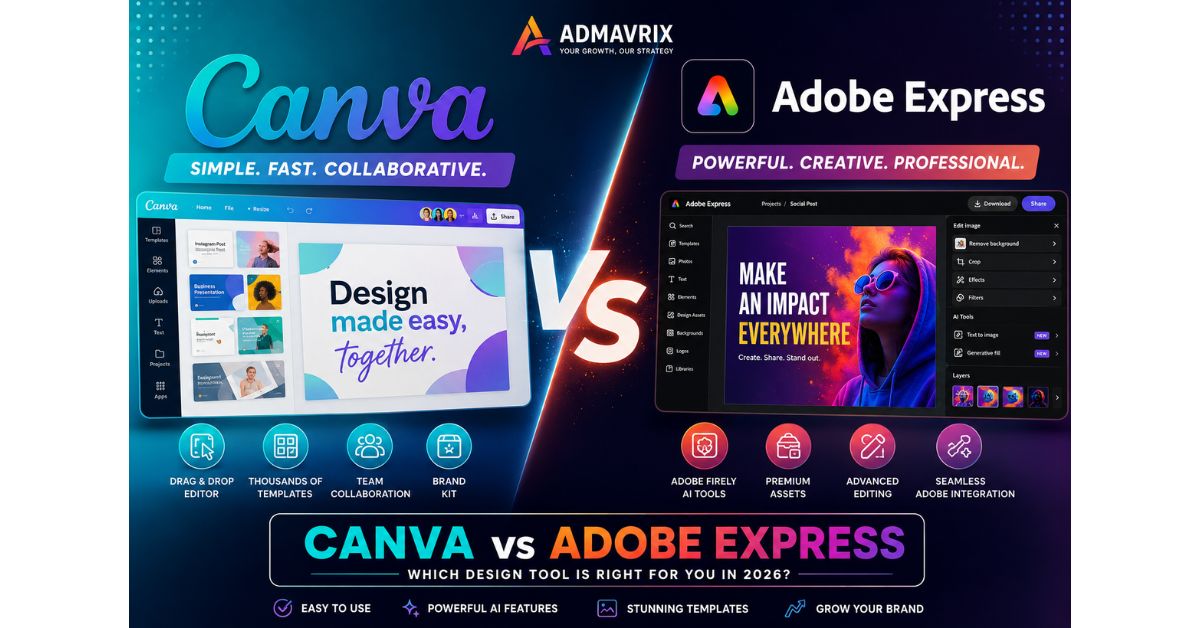
Which platform actually delivers better results in 2026—Canva or Adobe Express?
With AI-powered design tools transforming digital marketing, businesses and creators are searching for the fastest, smartest, and most cost-effective way to create professional content.
The Canva vs Adobe Express debate has never been more important.
Both platforms now offer advanced AI features, brand kits, video editing, social media templates, and collaborative workflows.
But which one deserves your investment?
This comprehensive guide breaks down everything you need to know.
Introduction
Visual content continues to dominate digital marketing in 2026.
Brands that consistently produce high-quality graphics, videos, presentations, and social media posts outperform competitors across virtually every industry.
Fortunately, modern design platforms have made professional content creation accessible to everyone.
Two names dominate this space:
- Canva
- Adobe Express
Both platforms target creators, marketers, small businesses, and enterprises, yet they take fundamentally different approaches to design.
Understanding the differences between Canva and Adobe Express can help organizations improve productivity, reduce costs, and create stronger digital experiences.
This complete comparison explores features, benefits, limitations, trends, pricing considerations, and future opportunities to help you make the right choice.
What Does Canva vs Adobe Express Mean?
The term Canva vs Adobe Express refers to comparing two leading cloud-based graphic design platforms that enable users to create:
- Social media graphics
- Presentations
- Videos
- Marketing materials
- Brand assets
- Documents
- Web content
- Advertisements
Both solutions focus on simplifying creative workflows, but their strengths differ significantly.
Canva prioritizes ease of use and collaboration, while Adobe Express integrates deeper creative capabilities powered by the Adobe ecosystem.
Key Points
Before diving deeper, here are the major differences.
Canva Excels In:
- Team collaboration
- User-friendly interfaces
- Massive template libraries
- Business presentations
- Social media content
- Educational use
Adobe Express Excels In:
- Professional creative workflows
- Adobe ecosystem integration
- Advanced AI tools
- Premium asset libraries
- Higher-quality editing capabilities
- Brand consistency
Both Platforms Offer:
- AI-powered design features
- Video editing tools
- Brand kits
- Social media scheduling
- Template customization
- Mobile applications
Visual Introduction
Canva vs Adobe Express at a Glance
CANVA
↓
Easy Learning
Team Collaboration
Massive Templates
Beginner Friendly

VS

ADOBE EXPRESS
↓
Professional Editing
Adobe Integration
Creative AI Tools
Premium Assets
Features Comparison
Canva Features
Magic Design AI
Canva automatically generates designs using AI prompts.
Brand Kit
Businesses can store:
- Logos
- Fonts
- Colors
- Templates
Team Collaboration
Multiple users can edit designs simultaneously.
Presentation Builder
Canva remains one of the best presentation tools available.
Content Planner
Users can schedule social media posts directly.
Adobe Express Features
Firefly AI Integration
Adobe Firefly delivers advanced generative AI capabilities.
Photoshop Integration
Users can move projects seamlessly into professional Adobe applications.
Premium Creative Assets
Adobe Stock offers millions of professional resources.
Advanced Video Editing
Adobe Express includes stronger video capabilities compared to many competitors.
PDF Editing Tools
Businesses benefit from deeper document workflows.
Benefits of Canva
Faster Content Creation
Templates dramatically reduce production time.
Easy Learning Curve
Beginners can become productive quickly.
Better Team Collaboration
Marketing teams benefit from shared workspaces.
Cost Efficiency
Canva offers strong value for small businesses.
Huge Template Ecosystem
Thousands of professionally designed assets are available.
Benefits of Adobe Express
Professional Creative Quality
Adobe maintains exceptional design standards.
Strong AI Capabilities
Firefly continues leading creative AI innovation.
Better Adobe Integration
Creative professionals enjoy seamless workflows.
Premium Asset Access
Adobe Stock strengthens visual storytelling.
Advanced Editing Flexibility
Users gain greater control over creative projects.
Quick Insights Table
| Category | Canva | Adobe Express |
|---|---|---|
| Ease of Use | Excellent | Very Good |
| AI Features | Strong | Excellent |
| Templates | Outstanding | Very Good |
| Collaboration | Excellent | Good |
| Video Editing | Good | Excellent |
| Adobe Integration | Limited | Outstanding |
| Business Use | Excellent | Excellent |
| Learning Curve | Minimal | Moderate |
| Best For | Beginners & Teams | Professionals |
Small Case Study
Startup Marketing Team Increases Productivity by 60%
A growing e-commerce startup needed faster content production.
Challenges included:
- Slow graphic creation
- Inconsistent branding
- Multiple approval cycles
The team implemented Canva.
Results after three months:
- 60% faster design production
- Better collaboration
- Reduced outsourcing costs
- Improved brand consistency
For their advanced advertising videos, they later integrated Adobe Express into their workflow.
The hybrid approach delivered maximum efficiency.
Deep Explanation: Canva vs Adobe Express
User Experience
Canva
Canva prioritizes simplicity.
Its drag-and-drop editor allows virtually anyone to create professional designs without prior experience.
The interface feels intuitive and highly accessible.
Adobe Express
Adobe Express offers a cleaner experience than traditional Adobe software but still includes more professional controls.
Creative professionals may prefer this additional flexibility.
AI Capabilities
AI tools define modern content creation.
Canva AI Tools
Canva provides:
- Magic Design
- Magic Write
- AI image generation
- Background removal
- Text-to-video features
Adobe Firefly AI
Adobe Express leverages Firefly for:
- Generative image creation
- Text effects
- Object removal
- Style transfers
- Commercially safe AI content
Firefly remains one of the strongest advantages for Adobe users.
Template Libraries
Templates save enormous amounts of time.
Canva Templates
Canva dominates this category.
Users gain access to:
- Instagram posts
- YouTube thumbnails
- Presentations
- Flyers
- Infographics
- Resumes
- Websites
The variety is unmatched.
Adobe Express Templates
Adobe offers high-quality templates but a smaller selection.
Its emphasis remains on professional creativity rather than quantity.
Collaboration Features
Modern marketing depends on teamwork.
Canva Collaboration
Canva excels with:
- Shared folders
- Team workspaces
- Real-time editing
- Approval systems
- Brand management
Adobe Collaboration
Adobe Express supports collaboration but remains more creator-focused.
Organizations deeply invested in Adobe products gain the greatest value.
Real Example: Agency Workflow Success
A digital marketing agency used both platforms strategically.
Their process included:
Canva For:
- Client presentations
- Social media posts
- Quick campaign assets
- Internal communication materials
Adobe Express For:
- Premium video ads
- Brand campaigns
- Advanced visual editing
- Creative experimentation
The combination improved efficiency while maintaining professional quality.
Trends in 2026
AI-Generated Content Growth
AI continues transforming design workflows.
Collaborative Design Ecosystems
Remote teams demand better collaboration tools.
Brand Consistency Platforms
Companies increasingly prioritize centralized brand management.
Video-First Marketing
Short-form content requires stronger video capabilities.
Multi-Platform Publishing
Integrated scheduling features are becoming standard.
Common Mistakes
Choosing Based Only on Price
Functionality matters more than monthly costs.
Ignoring Team Requirements
Collaboration needs vary significantly.
Overlooking Future Growth
Businesses should consider long-term scalability.
Not Testing Free Versions
Hands-on experience provides valuable insights.
Underestimating AI Features
AI dramatically impacts productivity today.
Pro Tips
Use Canva for Daily Marketing Tasks
Templates accelerate routine content creation.
Use Adobe Express for Premium Campaigns
Professional assets improve brand perception.
Maintain Brand Kits
Consistency strengthens customer trust.
Leverage AI Automation
AI reduces repetitive design work.
Build Reusable Templates
Standardization improves efficiency.
Expert Quotes
“The best design platform is the one that removes friction from creativity.”
— Digital Branding Expert
“AI is no longer optional. It is becoming the foundation of modern content production.”
— Marketing Technology Consultant
“Businesses that combine creativity with operational efficiency consistently outperform competitors.”
— Creative Strategy Advisor
Step-by-Step Guide: How to Choose Between Canva and Adobe Express
Step 1
Define your content requirements.
Step 2
Identify your team collaboration needs.
Step 3
Evaluate existing software ecosystems.
Step 4
Test both free versions.
Step 5
Compare AI capabilities.
Step 6
Review template availability.
Step 7
Analyze video production requirements.
Step 8
Consider long-term business growth.
Step 9
Standardize brand assets.
Step 10
Implement the platform that delivers maximum productivity.
Future Outlook
The future of design software will be increasingly AI-driven.
By 2027 and beyond, we can expect:
- Smarter generative design assistants
- Automated brand management
- Personalized content creation
- Enhanced collaboration tools
- AI-powered video production
- Real-time audience optimization
Canva will likely continue dominating accessibility and collaboration, while Adobe Express strengthens professional creative capabilities through deeper AI integration.
Businesses that embrace these innovations will gain significant competitive advantages.
Conclusion
The Canva vs Adobe Express debate ultimately depends on your goals.
Choose Canva if you prioritize:
- Ease of use
- Team collaboration
- Massive template libraries
- Fast content production
Choose Adobe Express if you prioritize:
- Professional creative workflows
- Firefly AI
- Adobe integration
- Advanced editing features
For many organizations, the smartest strategy involves using both platforms together.
The future belongs to businesses that combine creativity, AI, and operational efficiency to build stronger digital experiences.
Ready to Elevate Your Brand’s Digital Presence?
At Admavrix, we help businesses build powerful digital strategies through:
- SEO services
- Content marketing
- Social media management
- AI-powered marketing solutions
- Brand growth consulting
Whether you need engaging visuals, better search rankings, or high-converting campaigns, our experts can help you achieve sustainable growth.
Contact Admavrix today and transform your digital marketing success in 2026.
FAQ Section
Which is better: Canva or Adobe Express?
It depends on your needs. Canva is ideal for beginners and collaboration, while Adobe Express offers stronger professional editing capabilities and Adobe integration.
Is Canva easier to use than Adobe Express?
Yes. Canva generally provides a simpler learning curve for new users.
Does Adobe Express include AI tools?
Yes. Adobe Express uses Firefly AI for image generation, text effects, and advanced creative workflows.
Can businesses use both platforms together?
Absolutely. Many companies use Canva for everyday marketing materials and Adobe Express for premium creative projects.
Which platform is better for social media content?
Canva typically offers more templates and easier workflows for social media marketing.
Is Adobe Express suitable for professional designers?
Yes. Especially for users already working within the Adobe ecosystem.